macos-iso-builder
3,110
Stars
—
Forks
0
Watchers
—
Open Issues
待补全
许可证
Shell
语言
—
创建时间
最近更新
项目能做什么
通过 GitHub Actions 直接从 Apple 服务器生成可启动的 macOS 安装 ISO/DMG 镜像,无需 Mac。
来源:AI 基于仓库事实生成
· 内容以仓库实际 README 为准
使用说明 查看原始 README 原仓库文档
中文使用说明暂未生成。下面保留原仓库 README 摘录,命令与配置均以原文为准。
原始 README 摘录(英文原文,节选前 3000 字符)
# Overview Build bootable macOS installer ISOs and DMGs directly from Apple's servers — no Mac required. This project has two parts: 1. A script (`mkmaciso`) that uses only macOS built-in tools and commands to download and install the full macOS installer from Apple's servers into **/Applications**, and then creates bootable ISO/DMG images. 2. GitHub Action workflows that run `mkmaciso` on Azure datacenter-hosted Mac minis if you don't have macOS. ## Before you start Check [Release page](https://github.com/LongQT-sea/mkmaciso/releases/latest) first - someone might've already built what you need. If not, see [How to use](#how-to-use) to build your own. > [!Important] > GitHub-hosted runners are a free public resource — please use them responsibly. ## Disk Image Formats | | ISO | DMG | |---|---|---| | Best for | Virtual Machines | Bootable USB | | VM Support | Attach as virtual DVD | Attach as virtual hard disk | | Layout | Hybrid UDF/HFS | Raw GPT disk image | **ISO files** - These work great for VMs *(Proxmox, QEMU, VMware)*. Just attach them like a virtual DVD. They'll even mount in Windows if you need to poke around inside. **DMG files** - Flash these to a USB drive with [Rufus](https://rufus.ie/en/#download) *(Windows)*, `dd` *(Linux)*, or `asr` *(macOS)* to make bootable installation media. For VM use, convert them to `.vhd` *(for Hyper-V)* or `.vmdk` *(for VMware)* with `qemu-img`. QEMU/Proxmox can use the raw disk image without conversion. > Note: DMG files ship with a `.img` suffix *(e.g. macOS_Sequoia.dmg.img)* so Rufus can find them without switching to "All files" in Explorer. ## Supported versions Pretty much everything from OS X Lion (10.7, 2011) through the latest macOS Tahoe (26, 2025). Full list: Lion, Mountain Lion, Mavericks, Yosemite, El Capitan, Sierra, High Sierra, Mojave, Catalina, Big Sur, Monterey, Ventura, Sonoma, Sequoia, Tahoe. --- ## How to use ### Don't have macOS? Use GitHub Actions > [!TIP] > <details> > <summary>Click here to watch a visual guide (GIF)</summary> > > 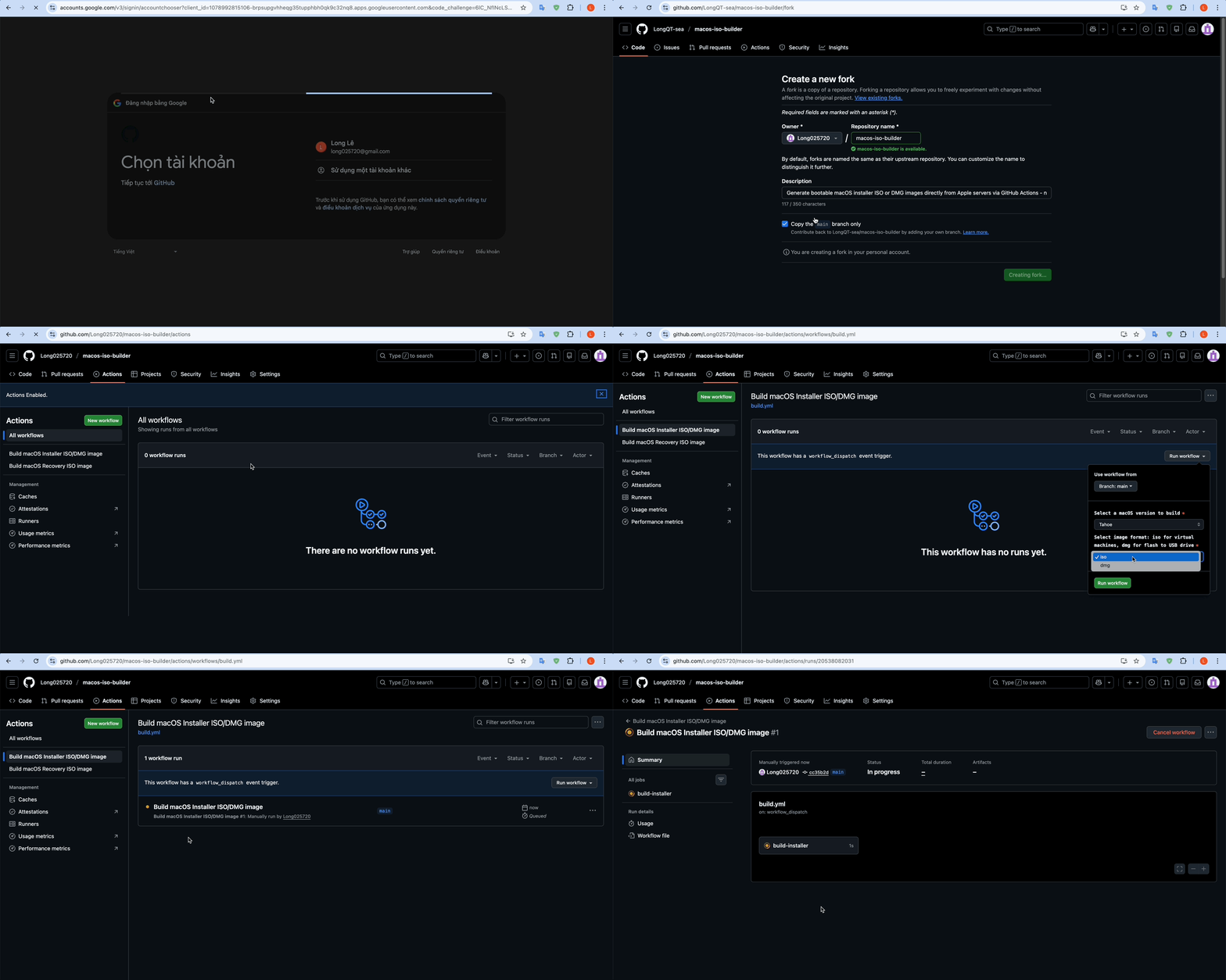 > > </details> 1. Star and then [Fork](https://github.com/LongQT-sea/macos-iso-builder/fork) this repository (requires a GitHub account).<br> <img src="https://raw.githubusercontent.com/LongQT-sea/macos-iso-builder/main/.github/star_and_fork.jpg" width="500"> 2. Navigate to the **Actions** tab in your forked repository. 3. Click the green **"I understand my workflows, go ahead and enable them"** button. 4. Select a workflow from the left sidebar: * **Recovery ISO** *(recommended)* - Small recovery image, builds in 2-5 minutes. Good for VMs. * **Full Installer** - Complete offline installer, 5-18GB, takes 5-60 minutes to build. 5. Click the **"Run workflow"** button and configure the workflow inputs: * **macOS version** – Choose a version (*Sequoia*, *Sonoma*, etc.). * **Image format阅读完整原文
项目深度分析 AI 生成
开箱即用型 macOS 虚拟机模板与一键配置工具
| 产品构想 | 基于该项目生成的纯净镜像,预先注入 OpenCore/EFI 和优化驱动,制成适用于 Proxmox VE、VMware、VirtualBox 的一键导入虚拟机镜像/配置包。 |
| 核心功能 | 适配主流版本的预调优 VM 模版(PVE 模版/VMware OVA);自动化一键导入与网卡/显卡直通引导脚本;性能调优参数指南。 |
| 目标用户 | 不想折腾底层 KVM 参数与 EFI 注入的 PVE、VMware 开发者与系统爱好者。 |
| 难度/周期 | 中等 · 2-4 周 · 成本:极低(测试用硬件或云主机,数件已有设备即可) |
| 收费模式 | 数字商品销售(Gumroad / 爱发电单次购买模板包);赞助者专享高级模板库。 |
| 竞争风险 | Apple 软件许可协议(EULA)对非苹果硬件运行 macOS 的法律版权合规风险(AI推测)。 |
| 依据 | 数据支持的判断 |
macOS 镜像极速直链加速与预构建归档订阅
| 产品构想 | 建立自动化定时构建流水线,持续构建各版本官方完整 ISO/DMG,提供高速对象存储 CDN 下载通道及校验和校验,免去用户自行 Fork 配置 GitHub Actions 的耗时。 |
| 核心功能 | 全版本(10.7 至最新版)镜像每日/每周同步;全球高速 CDN 下载直链;SHA256 官方源比对工具与纯净度校验报告。 |
| 目标用户 | 网络受限或不想/不会自行折腾 GitHub Actions 构建、需要快速获取安装介质的技术人员。 |
| 难度/周期 | 低 · 1-2 周 · 成本:中等(对象存储与高带宽流量成本) |
| 收费模式 | 按次下载付费(微支付)或会员制无限高速下载订阅。 |
| 竞争风险 | 带宽成本高昂;直接分发完整系统可能触碰 Apple 版权红线导致 DMCA 下架(尚需验证的假设)。 |
| 依据 | 已验证事实 |
跨平台 macOS 云端构建与自动化测试工作流方案
| 产品构想 | 针对缺少 Mac 的中小团队,封装一套结合 CI/CD(如 GitHub Actions/GitLab)的开箱即用 macOS 构建与 Headless VM 测试容器方案,提供咨询与私有化实施服务。 |
| 核心功能 | 云端持续集成中的无头 macOS 启动方案;自动化生成测试镜像的 CI Pipeline 模版;环境保活与快照还原自动化脚本。 |
| 目标用户 | 缺少 Mac 硬件资产但需构建/测试 Electron、Flutter、macOS 应用的独立开发者与小微初创团队。 |
| 难度/周期 | 高 · 1-2 个月 · 成本:低(主要为技术验证与咨询时间投入) |
| 收费模式 | 企业级 CI/CD 集成技术咨询;私有化自动化部署方案付费授权。 |
| 竞争风险 | 企业客户对苹果生态 EULA 合规要求极高,容易因合规审计而放弃采用(AI推测)。 |
| 依据 | 尚需验证的假设 |
AI 基于仓库公开数据分析生成,含推测成分,不构成收益承诺。
报告会保存到 个人中心
竞品与相似项目 GitHub Search 真实检索
相似项目数据正在完善中,暂不展示(避免误导)
项目优势与风险
| 技术成熟度 | 创建时间待补全,最近推送 ,发布过 14 个 Release |
| 社区活跃 | Star 3,110 / Fork 0 / Issue 0(数据支持,可自行核实) |
| 许可证 | 未检测到(需人工确认) |
| 主要风险 | 上游项目方向可能变化;同赛道竞争者较多(见竞品表);热度与需求不完全等价 |
安装与使用
此项目未提供 Docker 镜像,安装步骤以原仓库 README 为准(涉及依赖安装与环境配置,对新手门槛较高)。