Free-NTFS-for-Mac
2,520
Stars
—
Forks
0
Watchers
—
Open Issues
待补全
许可证
Swift
语言
—
创建时间
最近更新
项目能做什么
开源 Mac 端 NTFS 工具,支持全系 Mac 机型,提供 NTFS 盘完整读写、挂载与管理。
来源:AI 基于仓库事实生成
· 内容以仓库实际 README 为准
使用说明 查看原始 README 原仓库文档
中文使用说明暂未生成。下面保留原仓库 README 摘录,命令与配置均以原文为准。
原始 README 摘录(英文原文,节选前 3000 字符)
# Nigate **Language / 言語 / 语言**: [English](README.md) | [日本語](README.ja.md) | [简体中文](README.zh-CN.md) Nigate is a native macOS application for mounting NTFS volumes with read/write support. Download the latest version from the [release tags](https://github.com/hoochanlon/Free-NTFS-for-Mac/tags). 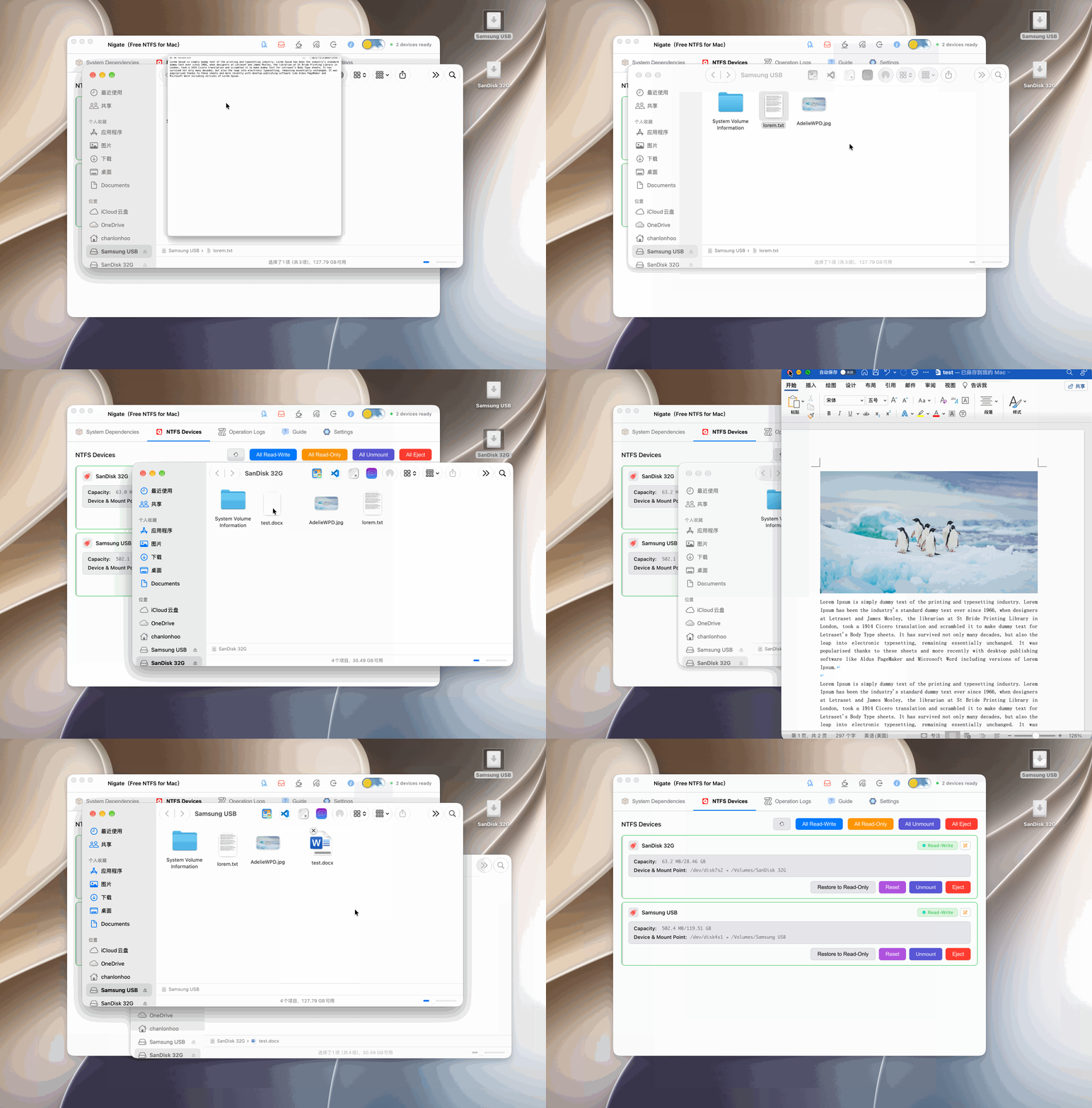 The demo shows a version older than 1.5.4. The interface may change as features are added. ## Features - **Modern interface**: A clean SwiftUI interface with dark-mode support - **Live monitoring**: Detects connected NTFS devices automatically - **Dependency checks**: Checks for and helps install the required system dependencies - **One-click mounting**: Mounts NTFS volumes in read/write mode when supported - **Automatic read/write mounting**: Newly connected NTFS devices can be mounted automatically; devices explicitly set to read-only are respected - **Status display**: Shows device state and operation logs clearly - **Prevent sleep**: Keeps the Mac awake during long-running operations - **Safety protection**: Hold the protection control for three seconds to disable automatic mounting, tray mode, and sleep prevention and avoid accidental operations - **Multilingual interface**: Simplified Chinese, Traditional Chinese, Japanese, English, German, and more ## Important notes > [!CAUTION] > Stability and data integrity depend on the storage device. Use reliable USB storage with high-quality flash memory and stable read/write performance to reduce the risk of I/O errors, interrupted transfers, or device detection failures. > [!IMPORTANT] > **Read/write behavior:** > - **Basic operations**: Copying, moving, deleting, and renaming files are supported as metadata-level operations. > - **Editing and saving**: The GUI mounts NTFS volumes in read/write mode and maps file ownership to the current macOS user's `uid` / `gid`. Text and image files can be edited and saved in tested configurations, but compatibility depends on the editor and its save strategy. > - **When saving fails**: Back up important data first. Edit a copy on the Mac and copy it back to the device when necessary. Editors that create a temporary file and rename it into place may work in some cases, but no workaround is guaranteed. - **Administrator privileges**: Mounting requires administrator privileges and macOS will request a password. - **Windows Fast Startup**: Mounting may fail if the device was used by Windows with Fast Startup enabled. Fully shut down Windows, or disable Fast Startup, before reconnecting the device. - **Device names**: USB storage device names must not contain spaces or unsupported characters. - **Gatekeeper**: macOS may block an unsigned application on first launch. Prefer the per-application approval in System Settings > Privacy & Security. Avoid disabling Gatekeeper globally unless you understand the security consequences. - **Bootable USB devices**: A device previously阅读完整原文
项目深度分析 AI 生成
商业化闭源/高级版桌面客户端 (Nigate Pro)
| 产品构想 | 在现有开源版基础上,推出内置免终端配置驱动、自动签名分发、提供自动故障修复与官方支持的商业买断版本 |
| 核心功能 | 内置引导驱动安装、后台静默挂载、坏道/脏卷(Dirty Bit)自动修复、系统通知集成、自动更新与免 Gatekeeper 告警签名 |
| 目标用户 | 不愿在终端安装 macFUSE/ntfs-3g 的普通 Mac 用户、数字游民、轻度创作者 |
| 难度/周期 | 中等 · 1-2 个月 · 成本:Apple 开发者账号年费 ($99)、域名与静态服务器开销 |
| 收费模式 | 一次性买断制 (如 $9.9 - $19.9/买断,对比 Paragon/Tuxera 的高价平替) |
| 竞争风险 | 底层依然严重依赖 macFUSE 和 ntfs-3g,开源驱动在内核扩展或文件系统授权上的 macOS 兼容风险;数据丢失引发的用户索赔纠纷 |
| 依据 | 已验证事实 |
跨平台磁盘健康与多格式挂载工具箱
| 产品构想 | 扩展支持 Ext4、Btrfs 等更多 Windows/Linux 文件系统,并加入磁盘健康监控 (S.M.A.R.T.) 和安全弹出保护 |
| 核心功能 | 多文件系统一键挂载 (NTFS/Ext4)、S.M.A.R.T. 寿命预警、强行占用唤醒与安全解除占用弹出、休眠唤醒自动重连 |
| 目标用户 | 双系统开发者、NAS/Linux 用户、多设备互联的技术极客 |
| 难度/周期 | 高 · 3-4 个月 · 成本:研发设备采购(各类存储卡与读卡器)、测试机成本 |
| 收费模式 | 功能模块内购解锁或专业版订阅 ($1.99/月 或 $14.99/年) |
| 竞争风险 | 底层多文件系统驱动的维护复杂度高,Apple 权限策略对内核扩展限制进一步收紧 |
| 依据 | AI推测 |
开箱即用打包安装器与技术支持/赞助计划
| 产品构想 | 保持开源核心,提供官方公证签名的完整 PKG 安装包、驱动一键部署脚本及一对一在线技术排障服务 |
| 核心功能 | 获得 Apple Notarization 的签名安装器、一键卸载清理工具、专属排障工单支持 |
| 目标用户 | 小白用户、对安全性要求高不想运行未签名软件的保守型 Mac 用户 |
| 难度/周期 | 低 · 2-3 周 · 成本:Apple 开发者证书费用 |
| 收费模式 | Gumroad/爱发电/GitHub Sponsors 付费下载已签名安装包或赞助支持 ($3 - $5/份) |
| 竞争风险 | 付费转化率偏低,大量用户可能依然选择自行编译或下载未签名 release |
| 依据 | 数据支持的判断 |
AI 基于仓库公开数据分析生成,含推测成分,不构成收益承诺。
报告会保存到 个人中心
竞品与相似项目 GitHub Search 真实检索
相似项目数据正在完善中,暂不展示(避免误导)
项目优势与风险
| 技术成熟度 | 创建时间待补全,最近推送 ,发布过 2 个 Release |
| 社区活跃 | Star 2,520 / Fork 0 / Issue 0(数据支持,可自行核实) |
| 许可证 | 未检测到(需人工确认) |
| 主要风险 | 上游项目方向可能变化;同赛道竞争者较多(见竞品表);热度与需求不完全等价 |
安装与使用
此项目未提供 Docker 镜像,安装步骤以原仓库 README 为准(涉及依赖安装与环境配置,对新手门槛较高)。