no-neck-pain.nvim
972
Stars
—
Forks
0
Watchers
—
Open Issues
待补全
许可证
Lua
语言
—
创建时间
最近更新
项目能做什么
极简且高度可扩展的 Neovim 居中禅模式插件,保护颈椎健康。
来源:AI 基于仓库事实生成
· 内容以仓库实际 README 为准
使用说明 查看原始 README 原仓库文档
中文使用说明暂未生成。下面保留原仓库 README 摘录,命令与配置均以原文为准。
原始 README 摘录(英文原文,节选前 3000 字符)
<p align="center">
<h1 align="center">☕ no-neck-pain.nvim</h1>
</p>
<p align="center">
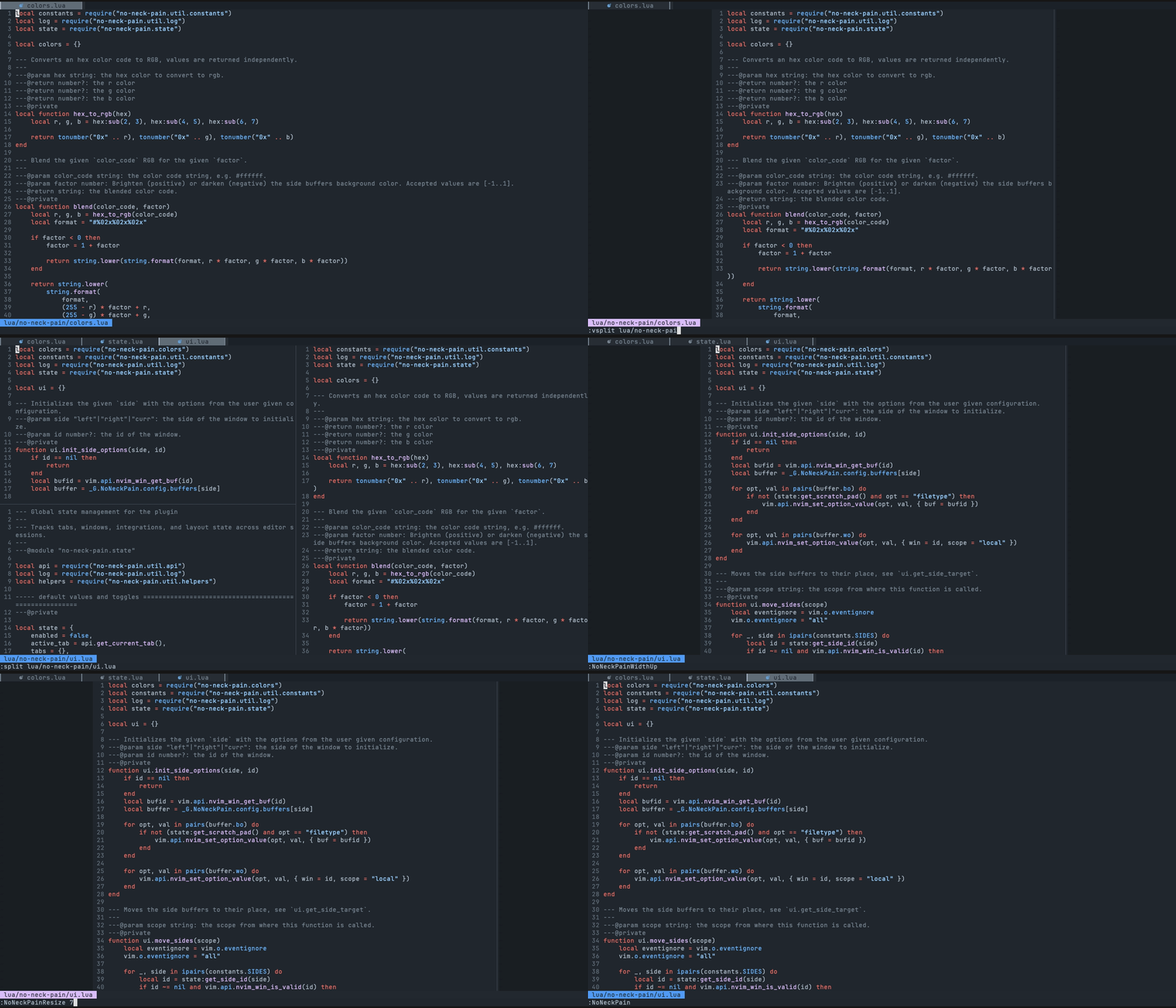
Dead simple plugin to center the currently focused buffer to the middle of the screen.
</p>
<div align="center">
</div>
no-neck-pain.nvim opens an empty window on each side of the focused window, so your code sits in the middle of the screen at a fixed width. It does not change your splits, tabs, or keymaps, and it works with no configuration.
<!-- SECTION: FEATURES -->
## ⚡️ Features
- Works without configuration: run `:NoNeckPain`.
- Keeps the layout centered across [splits and vsplits](https://github.com/shortcuts/no-neck-pain.nvim/wiki/Showcase#splits), tabs, and terminal resizes.
- Side buffers can be [colored](https://github.com/shortcuts/no-neck-pain.nvim/wiki/Showcase#side-buffer-colors) or used as [scratch pads](https://github.com/shortcuts/no-neck-pain.nvim/wiki/Showcase#side-buffers-as-scratch-pads) that save to a file.
- [Integrates](https://github.com/shortcuts/no-neck-pain.nvim/wiki/Integrations) with file trees (neo-tree, nvim-tree, snacks explorer), symbol panels (aerial, outline), neotest, nvim-dap-ui, and dashboards.
- Requires Neovim 0.10 or later. For Neovim 0.7 and 0.8, use the frozen [1.x branch](https://github.com/shortcuts/no-neck-pain.nvim/tree/1.x). For 0.9, use the [2.x branch](https://github.com/shortcuts/no-neck-pain.nvim/tree/2.x).
<!-- SECTION: INSTALLATION -->
## 📋 Installation
Pin a release with the snippets below. Remove the version pin to follow `main`.
[folke/lazy.nvim](https://github.com/folke/lazy.nvim)
```lua
{ "shortcuts/no-neck-pain.nvim", version = "*" }
```
[wbthomason/packer.nvim](https://github.com/wbthomason/packer.nvim)
```lua
use({ "shortcuts/no-neck-pain.nvim", tag = "*" })
```
[junegunn/vim-plug](https://github.com/junegunn/vim-plug)
```vim
Plug 'shortcuts/no-neck-pain.nvim', { 'tag': '*' }
```
[nix-community/nixvim](https://github.com/nix-community/nixvim)
```nix
plugins.no-neck-pain.enable = true;
```
<!-- SECTION: GETTING_STARTED -->
## ☄ Getting started
Run `:NoNeckPain` to center the current window. Run it again to go back to your normal layout.
To change the defaults, call `setup()` once in your config. This example sets the centered width to 120 columns, enables the default keymaps (`<Leader>np` toggles the plugin), and turns the plugin on when Neovim starts:
```lua
require("no-neck-pain").setup({
width = 120,
mappings = { enabled = true },
autocmds = { enableOnVimEnter = true },
})
```
<!-- SECTION: CONFIGURATION -->
## ⚙ Configuration
Every option is optional. The [Showcase](https://github.com/shortcuts/no-neck-pain.nvim/wiki/Showcase) has a screenshot for the common ones. Inside Neovim, `:h NoNeckPain.options` lists the plugin options and `:h NoNeckPain.bufferOptions` lists the side buffer options.
<details>
<summary>All option
阅读完整原文
项目深度分析 AI 生成
跨编辑器/跨窗口的屏幕视线居中与工效学桌面小工具 (Menubar / Tray App)
| 产品构想 | 跳出 Neovim 局限,基于项目'保护颈椎/视线居中'的理念,开发适用于 macOS/Windows 的轻量级窗口辅助工具,为浏览器、VS Code、终端等任意窗口自动保持最佳颈椎阅读视野与居中留白。 |
| 核心功能 | 全局快捷键一键居中并约束应用宽度、两侧留白区域展示系统监控或便签、定时视线偏离提醒与颈椎拉伸建议。 |
| 目标用户 | 超宽屏显示器用户、注重人体工学的程序员和办公人群。 |
| 难度/周期 | 中等 · 2-3 个月 · 成本:开发机、苹果/微软开发者账号(约 $99/年) |
| 收费模式 | 买断制独立软件($9.99 - $19.99 一次性购买)或 Setapp 上架分成。 |
| 竞争风险 | 系统级窗口管理工具竞争激烈(如 Rectangle、Raycast 具备部分窗口居中能力),需要强打'视线保护与极简留白'差异化。 |
| 依据 | AI推测 |
开发者专属侧边草稿协同与知识沉淀云服务 (Cloud Scratchpad)
| 产品构想 | 利用 no-neck-pain.nvim 提供的两侧 buffer(草稿区)特性,开发配套的云同步与导出插件,将临时 scratchpad 内容一键转为 Obsidian/Notion 笔记或团队 Gist/Snippet。 |
| 核心功能 | 跨设备 Scratchpad 实时同步、一键导出为 Markdown/结构化文档、支持端到端加密、AI 一键整理零散草稿。 |
| 目标用户 | 习惯在写代码时用侧边栏快速做笔记、写 TODO、记录调试日志的重度 Neovim 用户。 |
| 难度/周期 | 中等 · 1-2 个月 · 成本:轻量云服务器、数据库存储及少量 API 费用(约 $20-50/月) |
| 收费模式 | SaaS 订阅制(Freemium,高级同步与 AI 整理每月 $3-5)。 |
| 竞争风险 | Neovim 用户群体极度崇尚本地纯文本文件(如 vimwiki、obsidian.nvim),对付费云同步服务的买单意愿较低。 |
| 依据 | 尚需验证的假设 |
开箱即用的人体工学极简 Neovim 发行版与会员支持计划 (Sponsorship / Pro Config)
| 产品构想 | 围绕健康编码、极简排版打造高度调优的 Neovim 人体工学配置包,结合 GitHub Sponsors 提供专属个性化主题、深度集成插件组合支持与优先功能定制。 |
| 核心功能 | 深度预配的文件树/调试器平滑居中适配、动态色彩自适应留白侧边栏、专属会员 Discord 交流群与配置答疑。 |
| 目标用户 | 希望开箱即用获得完美超宽屏/居中编辑体验的 Neovim 新手与资深爱好者。 |
| 难度/周期 | 低 · 2-4 周 · 成本:极低(仅时间成本) |
| 收费模式 | GitHub Sponsors 会员赞助($5 - $20/月)、一次性购买预调优配置指南包(Gumroad)。 |
| 竞争风险 | 收益上限极低,通常仅能覆盖咖啡费用,难以作为稳定商业业务支撑。 |
| 依据 | 已验证事实 |
AI 基于仓库公开数据分析生成,含推测成分,不构成收益承诺。
报告会保存到 个人中心
竞品与相似项目 GitHub Search 真实检索
相似项目数据正在完善中,暂不展示(避免误导)
项目优势与风险
| 技术成熟度 | 创建时间待补全,最近推送 ,发布过 95 个 Release |
| 社区活跃 | Star 972 / Fork 0 / Issue 0(数据支持,可自行核实) |
| 许可证 | 未检测到(需人工确认) |
| 主要风险 | 上游项目方向可能变化;同赛道竞争者较多(见竞品表);热度与需求不完全等价 |
安装与使用
此项目未提供 Docker 镜像,安装步骤以原仓库 README 为准(涉及依赖安装与环境配置,对新手门槛较高)。